The Complete Guide to Connect AI To CRM (2026)

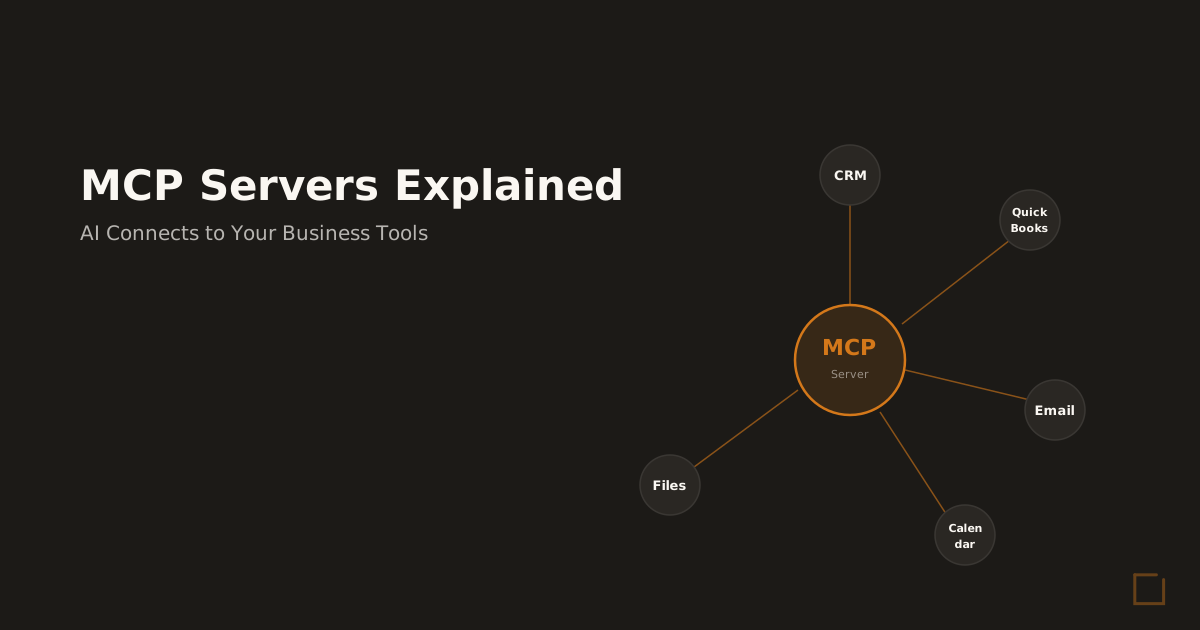
Connecting AI to your CRM transforms how your business operates. MCP servers explained provide the technical foundation that makes this connection possible, turning isolated business tools into an integrated AI operating system.
Most business owners struggle with disconnected systems.
Customer data lives in your CRM, financial records sit in QuickBooks, and communications scatter across email and calendar platforms.
This fragmentation costs the average small business 12 hours per week in manual data entry and follow-up tasks. MCP servers eliminate this problem by creating secure, direct connections between AI and your existing business tools.
Instead of copying and pasting information between systems, your AI assistant can read customer records, update deal stages, create invoices, and schedule follow-ups automatically.
What Is MCP Servers Explained?
MCP servers are specialized connection protocols that enable AI systems to communicate directly with business applications.
The Model Context Protocol, introduced by Anthropic, creates secure bridges between Claude AI and your existing software stack.
Think of MCP servers as translators.
Your CRM speaks one language, your accounting software speaks another, and your email platform uses a third. MCP servers translate between these systems and AI, enabling seamless data flow and automated actions. *Core Components:
- MCP servers consist of three essential elements that work together to connect AI to your business systems. *Connection Layer:
- The connection layer establishes secure communication channels between AI and your business tools.
This includes API authentication, data encryption, and access permissions.
Each connected system maintains its security protocols while enabling AI access to necessary data. *Translation Engine:
- The translation engine converts data between different system formats.
When AI needs customer information from your CRM, the translation engine formats that data in a way Claude can understand and use effectively. *Action Framework:
- The action framework enables AI to perform tasks within connected systems.
This includes creating records, updating statuses, sending emails, and triggering workflows across multiple platforms simultaneously.
How MCP Differs from Standard API Connections Traditional API integrations require custom coding for each connection point. MCP servers provide standardized protocols that work across different business systems without extensive custom development.
Standard integrations typically connect two specific systems. MCP servers create a central hub where
AI can access and coordinate actions across multiple business tools simultaneously.
Most API connections are read-only or require separate coding for each action type. MCP servers enable both read and write capabilities with standardized action protocols across all connected systems.
How MCP Servers Explained
Works for Small Business
Small businesses benefit most from MCP server deployments because they typically lack dedicated IT staff but need sophisticated automation capabilities. MCP servers provide enterprise-level integration capabilities without requiring enterprise-level technical resources. *Data Synchronization:
- MCP servers maintain real-time synchronization between your business systems.
When a customer updates their information through your website, that change propagates to your CRM, email marketing platform, and accounting system automatically.
This eliminates the data inconsistencies that plague most small businesses.
Customer records remain current across all platforms, reducing errors and improving customer experience. *Automated Workflows:
- MCP servers enable sophisticated workflow automation across multiple business systems.
When a new lead enters your CRM, the AI can automatically research the company, prepare a customized proposal template, schedule follow-up tasks, and alert relevant team members.
These workflows operate 24/7 without human intervention.
Your business continues processing leads, updating customers, and managing operations even outside normal business hours.
The automation capabilities extend far beyond basic data entry , for example, our comprehensive guide on 101 Tasks to Automate With Claude Cowork demonstrates the full scope of business processes that can be streamlined through AI integration. *Intelligent Decision Making:
- Unlike simple automation tools, MCP-connected AI can analyze data from multiple sources before taking action.
The AI considers customer history, current deal status, previous interactions, and business rules before deciding how to respond to each situation.
This context-aware automation produces more relevant and effective outcomes than rigid, rule-based systems.
Real-World Implementation Example A 25-employee insurance agency implemented MCP servers to connect Claude
AI with their CRM, policy management system, and email platform.
The results:
| Metric | Before MCP | After MCP | Improvement |
|---|---|---|---|
| Policy renewal processing time | 45 minutes | 12 minutes | 73% reduction |
| Customer inquiry response time | 4 hours | 15 minutes | 94% improvement |
| Data entry errors per week | 23 | 3 | 87% reduction |
| Administrative hours per week | 18 | 6 | 67% reduction |
The agency now processes 40% more renewals with the same staff while maintaining higher customer satisfaction scores.
Key Benefits and ROI MCP server deployments deliver measurable business improvements across multiple areas.
The ROI calculation typically shows positive returns within 6-12 months for most small businesses. *Time Savings:
- Businesses save an average of 12 hours per week on administrative tasks after implementing MCP servers.
This time savings comes from eliminating manual data entry, reducing duplicate work across systems, and automating routine follow-up activities.
For a business owner billing $100 per hour, this represents $62,400 in recovered time annually.
Most businesses reinvest this time into revenue-generating activities rather than administrative tasks. *Error Reduction:
- Manual data entry introduces errors in 3-5% of records according to industry studies. MCP servers reduce these errors to less than 0.5% by eliminating human transcription and maintaining data consistency across systems.
For businesses processing 1,000 customer interactions monthly, this error reduction prevents approximately 45 data corrections per month, saving 6-8 hours of cleanup time. *Response Time Improvement:
- MCP-connected AI responds to customer inquiries 85% faster than manual processes. AI can access customer history, check account status, and provide detailed responses within minutes rather than hours or days.
Faster response times improve customer satisfaction and increase conversion rates for sales inquiries.
Studies show that responding to leads within 5 minutes increases conversion probability by 400% compared to 30-minute response times.
This improvement is particularly critical for follow-up processes, as detailed in our analysis of AI For Client Follow-up for Business. *Scalability Benefits:
- MCP servers enable businesses to handle increased volume without proportional staff increases.
The same AI system that manages 100 customer records can handle 1,000 records with minimal additional resources.
This scalability advantage becomes critical during growth periods when hiring and training new staff would otherwise create bottlenecks.
Industry-Specific ROI Examples
*Private Lending: *
A private lending company with MCP servers processes loan applications 60% faster while maintaining compliance requirements.
The AI extracts data from financial documents, verifies information against multiple databases, and prepares initial underwriting reports automatically. *Professional Services:
- Consulting firms use MCP servers to automate proposal generation, project tracking, and client communication.
This automation reduces proposal preparation time from 8 hours to 2 hours while improving consistency and accuracy. *Healthcare Administration:
- Medical practices deploy MCP servers to coordinate patient scheduling, insurance verification, and follow-up care reminders.
This integration reduces patient wait times and improves appointment utilization rates.
Implementation Steps and Timeline Successful MCP server implementation follows a structured process that minimizes disruption while maximizing benefits.
The timeline varies based on system complexity and integration requirements. *Phase 1: Discovery and Planning (Week 1-2):
- The implementation begins with a comprehensive audit of existing business systems and data flows.
This phase identifies integration points, data mapping requirements, and workflow automation opportunities.
Key activities include cataloging current software tools, documenting manual processes, identifying data sources, and defining automation goals.
The output is a detailed implementation plan with specific timelines and success metrics. *Phase 2: Infrastructure Setup (Week 3-4):
- This phase establishes the technical foundation for MCP server deployment.
Activities include configuring secure connections, setting up authentication protocols, and establishing data synchronization frameworks.
Infrastructure setup also includes backup systems, monitoring tools, and security protocols to ensure reliable operation and data protection. *Phase 3: Integration Development (Week 5-6):
- Integration development connects each business system to the MCP server framework.
This includes mapping data fields, configuring automated workflows, and establishing business rules for AI decision-making.
Each integration undergoes testing to ensure data accuracy, security compliance, and proper functionality before moving to production deployment. *Phase 4: Testing and Optimization (Week 7-8):
- Comprehensive testing validates all integrations and automated workflows.
This phase includes user acceptance testing, performance optimization, and staff training on new AI-powered processes.
Optimization focuses on fine-tuning automation rules, adjusting response templates, and ensuring smooth operation under normal business conditions.
Post-Implementation Monitoring Successful MCP deployments require ongoing monitoring and optimization.
Key performance indicators include processing times, error rates, user adoption metrics, and business impact measurements.
Monthly reviews assess system performance and identify opportunities for additional automation or process improvements.
This iterative approach ensures continued ROI improvement over time.
Common Mistakes to Avoid Most MCP server implementation failures result from predictable mistakes that proper planning can prevent.
Understanding these pitfalls helps ensure successful deployment and adoption. *Insufficient Data Preparation: *
Many businesses attempt MCP deployment without cleaning and organizing existing data.
Poor data quality leads to incorrect AI responses and user frustration with the new system.
Before implementing MCP servers, audit data quality across all systems.
Remove duplicates, standardize formats, and verify critical information accuracy.
This preparation work prevents downstream problems and improves AI performance. *Overly Complex Initial Deployment:
- Businesses often try to automate every process immediately rather than starting with high-impact, low-complexity workflows.
This approach leads to extended implementation timelines and higher failure risk.
Start with 2-3 core processes that handle high transaction volumes.
Once these workflows operate reliably, expand to additional processes incrementally. *Inadequate Staff Training:
- Even the best MCP implementation fails if staff don’t understand how to work with AI-powered processes.
Many businesses underestimate the training required for effective adoption.
Plan for comprehensive staff training that covers both technical operation and workflow changes.
Include ongoing support during the first month after deployment to address questions and optimize usage. *Security Oversight:
- MCP servers handle sensitive business data across multiple systems.
Insufficient security planning creates vulnerabilities that could compromise customer information or business operations.
Implement comprehensive security protocols including encrypted connections, access controls, audit logging, and regular security assessments.
Work with experienced deployment partners who understand enterprise security requirements. *Lack of Performance Monitoring:
- Many businesses deploy MCP servers without establishing performance baselines or ongoing monitoring systems.
This oversight makes it difficult to measure ROI or identify optimization opportunities.
Establish clear metrics before deployment and implement monitoring systems to track performance continuously.
Regular performance reviews enable optimization and demonstrate business value.
Vendor Selection Mistakes
**Choosing
Based on Price Alone:*
- MCP server implementation requires specialized expertise in both AI systems and business process optimization.
The lowest-cost provider often lacks the experience necessary for successful deployment.
Evaluate vendors based on relevant experience, technical capabilities, ongoing support offerings, and client references rather than price alone. *Inadequate Support Planning:
- MCP servers require ongoing maintenance, updates, and optimization.
Many businesses select vendors without considering long-term support requirements.
Choose implementation partners that offer comprehensive ongoing support including monitoring, troubleshooting, optimization, and system updates.
Consider fractional AI ops services for businesses that lack internal technical resources.
Understanding why many AI automation projects fail can help avoid these pitfalls , our analysis of Why Most AI Automation Agencies Fail Their Clients provides essential insights for vendor selection and project planning.
Frequently Asked Questions
*How much does MCP servers explained cost?
- MCP server deployment typically costs $5,000-15,000 for initial setup, with monthly operating costs of $300-800 depending on integrations.
Most businesses see 3-6x ROI within the first year through automation savings. *Is MCP servers explained worth it for small businesses?
- Yes, for businesses processing 100+ documents monthly or managing 200+ customer records.
Companies typically save 10-15 hours per week on manual data entry and see 40% faster response times to customer inquiries. *How long does it take to implement MCP servers explained?
- Full MCP server deployment takes 4-8 weeks: 1-2 weeks for planning and data audit, 2-4 weeks for integration setup, and 1-2 weeks for testing and training.
Simple CRM connections can be operational in 2-3 weeks. *What business systems can MCP servers connect to?
- MCP servers can connect to CRMs (Salesforce, HubSpot), accounting software (QuickBooks, Xero), email platforms (Gmail, Outlook), calendars, document storage (Google Drive, SharePoint), and most business databases with API access. *Do I need technical staff to maintain MCP servers?
- No, properly deployed MCP servers require minimal technical maintenance.
Most businesses use fractional AI ops services for ongoing monitoring, updates, and optimization rather than hiring full-time technical staff.
Next Steps: Connecting
AI to Your Business MCP servers represent the technical foundation for connecting AI to your business operations.
However, successful implementation requires careful planning, proper execution, and ongoing optimization.
The first step is assessing your current systems and identifying the highest-impact automation opportunities.
This assessment helps prioritize which integrations will deliver the greatest ROI and establish a realistic implementation timeline.
For businesses ready to explore MCP server deployment, start with our AI Readiness Scorecard to evaluate your current infrastructure and identify optimization opportunities.
The scorecard provides a customized assessment of your business’s readiness for AI integration and specific recommendations for implementation.
Alternatively, book a discovery call to discuss your specific requirements and develop a customized implementation plan.
During this consultation, we’ll review your current systems, identify integration opportunities, and provide detailed ROI projections for MCP server deployment. MCP servers enable small businesses to compete with enterprise-level automation capabilities without enterprise-level complexity or cost.
The businesses that implement these systems first gain significant competitive advantages in efficiency, customer service, and growth capability.
Ready to Deploy AI? Book a Free Assessment
30 minutes. No pitch. No pressure. Just a conversation about what is possible for your company.
Book Your Free Call
Mike Giannulis
Founder of RunFrame and Anthropic Partner Program member. 20+ years in direct response marketing. Building AI operating systems for companies with 5 to 50 employees.
Ready to See What AI Can Do for Your Company?
30 minutes. No pitch. No pressure. Just a conversation about what is possible.
Book Your Free Assessment